
Development version
This is the latest (dev) documentation. It may contain unreleased features or breaking changes. For the stable release, use stable.
Basic Usage
This page walks through the two workflows you will use most:
- Hyperparameter tuning with
GASearchCV - Feature selection with
GAFeatureSelectionCV
Every code block below is executed to build this page, so what you copy is exactly what ran — including the outputs and figures.
Prerequisites
sklearn-genetic-optinstalled (pip install sklearn-genetic-opt)- Optional plotting extra for the figures:
pip install sklearn-genetic-opt[plot] - Basic familiarity with scikit-learn's
fit/predictAPI
Hyperparameter Tuning
We tune an MLPClassifier on the handwritten digits dataset (10 classes, 64 pixel features). First, the imports and data:
import numpy as np
from sklearn.datasets import load_digits
from sklearn.metrics import accuracy_score
from sklearn.model_selection import StratifiedKFold, train_test_split
from sklearn.neural_network import MLPClassifier

from sklearn_genetic import EvolutionConfig, GASearchCV, PopulationConfig, RuntimeConfig
from sklearn_genetic.space import Categorical, Continuous, Integer

RANDOM_STATE = 42

X, y = load_digits(return_X_y=True)
X_train, X_test, y_train, y_test = train_test_split(
    X, y, test_size=0.33, stratify=y, random_state=RANDOM_STATE
)
cv = StratifiedKFold(n_splits=3, shuffle=True, random_state=RANDOM_STATE)
print(f"train={X_train.shape} test={X_test.shape} classes={len(np.unique(y))}")train=(1203, 64) test=(594, 64) classes=10Define the search space
The keys in param_grid are estimator parameter names. Each value is a space the genetic algorithm samples from:
Integer— whole numbers in a rangeContinuous— floats in a range (optionallydistribution="log-uniform")Categorical— a fixed list of choices
param_grid = {
    "hidden_layer_sizes": Categorical([(32,), (64,), (32, 16)]),
    "alpha": Continuous(1e-5, 1e-1, distribution="log-uniform"),
    "learning_rate_init": Continuous(1e-4, 1e-1, distribution="log-uniform"),
    "activation": Categorical(["relu", "tanh"]),
    "batch_size": Integer(32, 256),
}
Configure and run the search
GASearchCV is configured with small config objects. EvolutionConfig controls the population and generations; PopulationConfig(initializer="smart") builds a diverse, well-spread starting population; RuntimeConfig controls parallelism and logging.
clf = MLPClassifier(max_iter=150, early_stopping=True, random_state=RANDOM_STATE)

search = GASearchCV(
    estimator=clf,
    random_state=RANDOM_STATE,
    cv=cv,
    scoring="accuracy",
    param_grid=param_grid,
    evolution_config=EvolutionConfig(population_size=8, generations=6),
    population_config=PopulationConfig(initializer="smart"),
    runtime_config=RuntimeConfig(n_jobs=-1, verbose=False),
)

search.fit(X_train, y_train)

print(f"Best CV accuracy : {search.best_score_:.4f}")
print(f"Best parameters : {search.best_params_}")Best CV accuracy : 0.9584
Best parameters : {'hidden_layer_sizes': (64,), 'alpha': 0.00027470715996250945, 'learning_rate_init': 0.003590489008293675, 'activation': 'relu', 'batch_size': 70}After fitting, GASearchCV behaves like any fitted scikit-learn estimator — it has already refit the best configuration on all of X_train:
y_pred = search.predict(X_test)
print(f"Holdout accuracy : {accuracy_score(y_test, y_pred):.4f}")Holdout accuracy : 0.9579Reading the evolution
Each generation is logged. Inspect the full history as a DataFrame — the columns explain how the population improved and how diverse it stayed:
| Column | Meaning |
|---|---|
gen | generation number |
fitness | mean CV score in the generation |
fitness_best | best CV score found so far |
genotype_diversity | 1.0 = diverse, 0.0 = converged |
unique_individual_ratio | fraction of distinct configurations |
stagnation_generations | consecutive generations without improvement |
import pandas as pd

history = pd.DataFrame(search.history)
print(history[["gen", "fitness", "fitness_best", "genotype_diversity",
"unique_individual_ratio", "stagnation_generations"]].to_string(index=False)) gen fitness fitness_best genotype_diversity unique_individual_ratio stagnation_generations
0 0.753325 0.946800 0.685714 1.000 0
1 0.932253 0.946800 0.485714 0.875 1
2 0.943890 0.955112 0.314286 0.750 0
3 0.945449 0.955112 0.371429 0.750 1
4 0.948462 0.955112 0.314286 0.750 2
5 0.951995 0.955112 0.314286 0.750 3
6 0.953242 0.958437 0.228571 0.625 0fit_stats_ summarizes what the search actually spent — useful for spotting wasted effort (e.g. many skipped_invalid_candidates):
for key, value in search.fit_stats_.items():
print(f"{key}: {value}")evaluated_candidates: 104
unique_candidates: 102
cross_validate_calls: 102
cache_hits: 2
duplicate_candidates: 0
skipped_invalid_candidates: 0
population_parallel_batches: 7
population_serial_batches: 0
random_immigrants: 0
local_refinement_candidates: 0Visualize convergence
With the [plot] extra installed, plot_fitness_evolution shows the best score climbing over generations, and plot_search_overview gives a compact diagnostic dashboard.
import matplotlib.pyplot as plt
from sklearn_genetic.plots import plot_search_overview

plot_search_overview(search, top_k=6)
plt.tight_layout()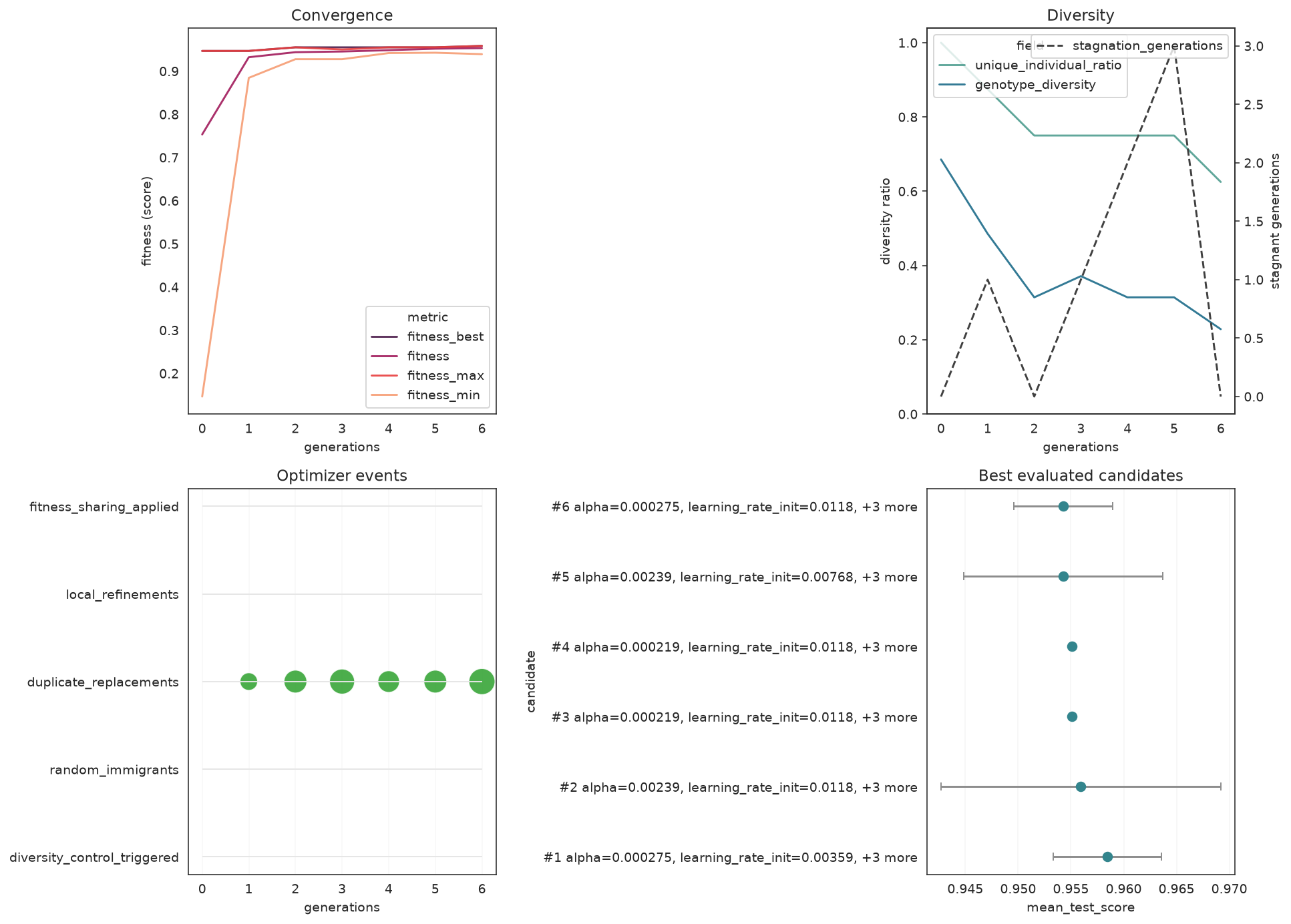
from sklearn_genetic.plots import plot_parameter_evolution

plot_parameter_evolution(search, parameters=["alpha", "learning_rate_init", "batch_size"])
plt.tight_layout()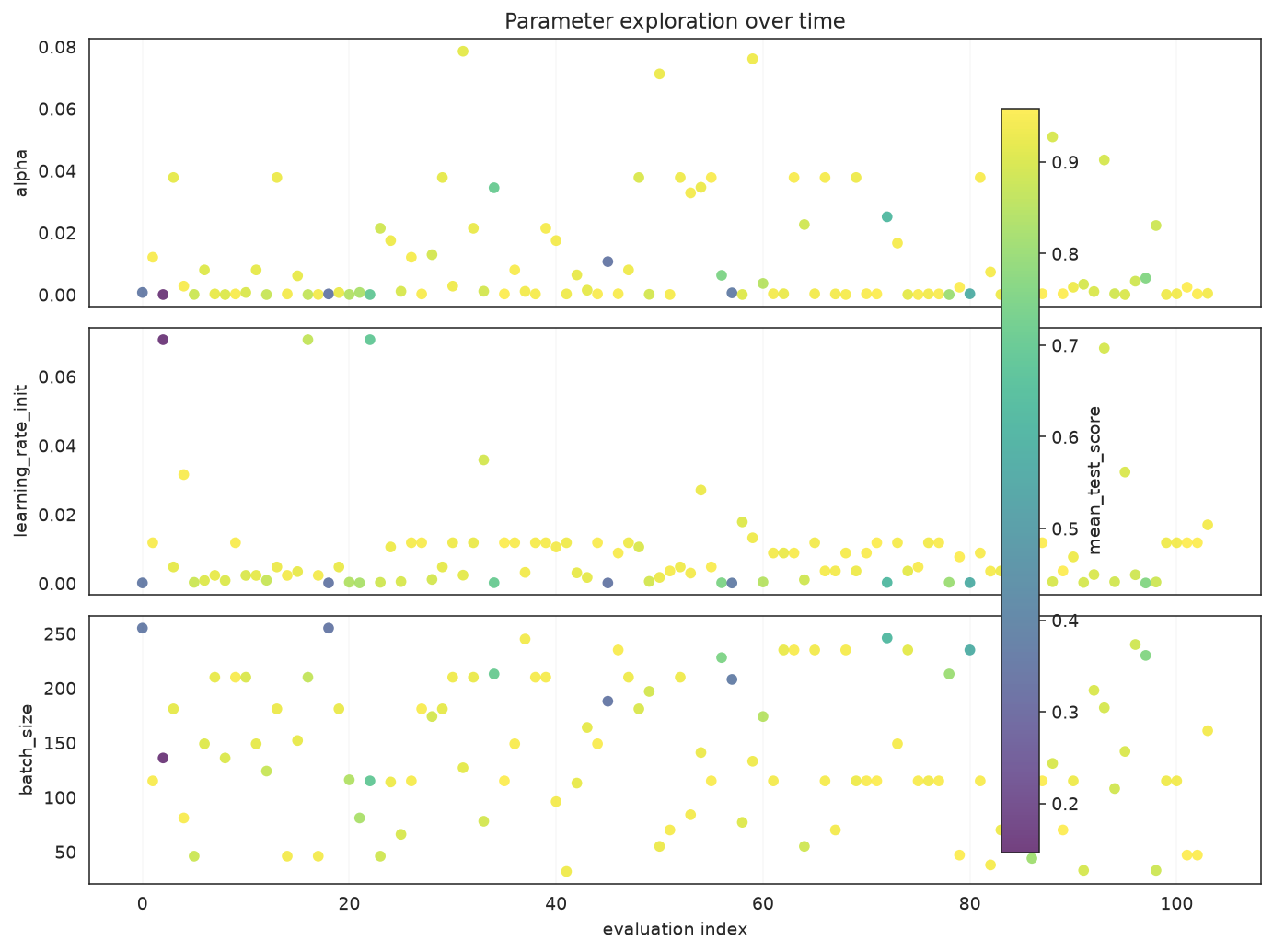
Feature Selection
GAFeatureSelectionCV searches for the most useful subset of columns. To make the task concrete we take the Iris dataset and bolt on 10 columns of pure noise; a good selector should keep the real measurements and discard the noise.
from sklearn.datasets import load_iris
from sklearn.svm import SVC

from sklearn_genetic import GAFeatureSelectionCV

iris = load_iris()
rng = np.random.default_rng(RANDOM_STATE)
noise = rng.uniform(0, 10, size=(iris.data.shape[0], 10))
X_fs = np.hstack([iris.data, noise])
feature_names = list(iris.feature_names) + [f"noise_{i}" for i in range(10)]
y_fs = iris.target

Xtr, Xte, ytr, yte = train_test_split(
    X_fs, y_fs, test_size=0.33, stratify=y_fs, random_state=RANDOM_STATE
)

selector = GAFeatureSelectionCV(
    estimator=SVC(gamma="auto"),
    random_state=RANDOM_STATE,
    cv=3,
    scoring="accuracy",
    evolution_config=EvolutionConfig(population_size=10, generations=8,
                                     elitism=True, keep_top_k=2),
    population_config=PopulationConfig(initializer="smart"),
    runtime_config=RuntimeConfig(n_jobs=-1, verbose=False),
)
selector.fit(Xtr, ytr)

selected = [name for name, keep in zip(feature_names, selector.support_) if keep]
print(f"Selected {len(selected)} of {len(feature_names)} features:")
for name in selected:
    print(f"  - {name}")
print(f"Holdout accuracy : {accuracy_score(yte, selector.predict(Xte)):.4f}")Selected 3 of 14 features:
- sepal length (cm)
- sepal width (cm)
- petal length (cm)
Holdout accuracy : 0.9800support_ is a boolean mask (True = kept). The search keeps the informative Iris measurements and drops most of the noise columns. Visualize the mask:
from sklearn_genetic.plots import plot_feature_selection

plot_feature_selection(selector, feature_names=feature_names)
plt.tight_layout()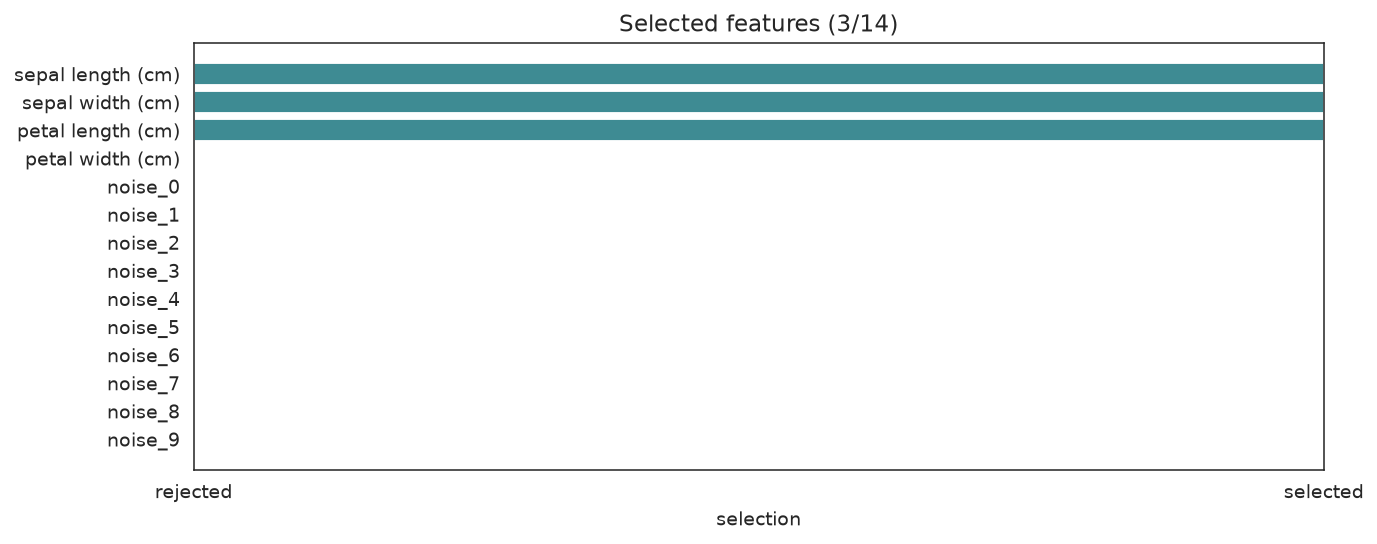
Tips & Gotchas
- Set
RuntimeConfig(verbose=True)to watch the per-generation log live. PopulationConfig(initializer="smart")is strongly recommended — it usually finds better solutions faster than a purely random start.- If
accuracyis already near 1.0 on your data, switch to a more discriminative metric (e.g.roc_auc,balanced_accuracy). - Check
fit_stats_["skipped_invalid_candidates"]after fitting — a non-zero value means some sampled configurations raised errors duringfit.
Next Steps
- When to Use — is a genetic search the right tool for your problem?
- Understanding Cross-Validation — read the generation log in depth
- Pipeline Tuning — tune a scikit-learn
Pipelinewithstep__paramnames - Callbacks — early stopping, progress bars, and checkpoints
- Plotting Gallery — every diagnostic plot, explained