
Basic Usage
This page walks through the two workflows you will use most:
- Hyperparameter tuning with
GASearchCV - Feature selection with
GAFeatureSelectionCV
Every code block below is executed to build this page, so what you copy is exactly what ran — including the outputs and figures.
Prerequisites
sklearn-genetic-optinstalled (pip install sklearn-genetic-opt)- Optional plotting extra for the figures:
pip install sklearn-genetic-opt[plot] - Basic familiarity with scikit-learn's
fit/predictAPI
Hyperparameter Tuning
We tune an MLPClassifier on the handwritten digits dataset (10 classes, 64 pixel features). First, the imports and data:
import numpy as np
from sklearn.datasets import load_digits
from sklearn.metrics import accuracy_score
from sklearn.model_selection import StratifiedKFold, train_test_split
from sklearn.neural_network import MLPClassifier

from sklearn_genetic import EvolutionConfig, GASearchCV, PopulationConfig, RuntimeConfig
from sklearn_genetic.space import Categorical, Continuous, Integer

RANDOM_STATE = 42

X, y = load_digits(return_X_y=True)
X_train, X_test, y_train, y_test = train_test_split(
    X, y, test_size=0.33, stratify=y, random_state=RANDOM_STATE
)
cv = StratifiedKFold(n_splits=3, shuffle=True, random_state=RANDOM_STATE)
print(f"train={X_train.shape} test={X_test.shape} classes={len(np.unique(y))}")train=(1203, 64) test=(594, 64) classes=10Define the search space
The keys in param_grid are estimator parameter names. Each value is a space the genetic algorithm samples from:
Integer— whole numbers in a rangeContinuous— floats in a range (optionallydistribution="log-uniform")Categorical— a fixed list of choices
param_grid = {
    "hidden_layer_sizes": Categorical([(32,), (64,), (32, 16)]),
    "alpha": Continuous(1e-5, 1e-1, distribution="log-uniform"),
    "learning_rate_init": Continuous(1e-4, 1e-1, distribution="log-uniform"),
    "activation": Categorical(["relu", "tanh"]),
    "batch_size": Integer(32, 256),
}
Configure and run the search
GASearchCV is configured with small config objects. EvolutionConfig controls the population and generations; PopulationConfig(initializer="smart") builds a diverse, well-spread starting population; RuntimeConfig controls parallelism and logging.
clf = MLPClassifier(max_iter=150, early_stopping=True, random_state=RANDOM_STATE)

search = GASearchCV(
    estimator=clf,
    random_state=RANDOM_STATE,
    cv=cv,
    scoring="accuracy",
    param_grid=param_grid,
    evolution_config=EvolutionConfig(population_size=8, generations=6),
    population_config=PopulationConfig(initializer="smart"),
    runtime_config=RuntimeConfig(n_jobs=-1, verbose=False),
)

search.fit(X_train, y_train)

print(f"Best CV accuracy : {search.best_score_:.4f}")
print(f"Best parameters : {search.best_params_}")Best CV accuracy : 0.9584
Best parameters : {'hidden_layer_sizes': (64,), 'alpha': 0.00027470715996250945, 'learning_rate_init': 0.003590489008293675, 'activation': 'relu', 'batch_size': 70}After fitting, GASearchCV behaves like any fitted scikit-learn estimator — it has already refit the best configuration on all of X_train:
y_pred = search.predict(X_test)
print(f"Holdout accuracy : {accuracy_score(y_test, y_pred):.4f}")Holdout accuracy : 0.9579Reading the evolution
Each generation is logged. Inspect the full history as a DataFrame — the columns explain how the population improved and how diverse it stayed:
| Column | Meaning |
|---|---|
gen | generation number |
fitness | mean CV score in the generation |
fitness_best | best CV score found so far |
genotype_diversity | 1.0 = diverse, 0.0 = converged |
unique_individual_ratio | fraction of distinct configurations |
stagnation_generations | consecutive generations without improvement |
import pandas as pd

history = pd.DataFrame(search.history)
print(history[["gen", "fitness", "fitness_best", "genotype_diversity",
"unique_individual_ratio", "stagnation_generations"]].to_string(index=False)) gen fitness fitness_best genotype_diversity unique_individual_ratio stagnation_generations
0 0.753325 0.946800 0.685714 1.000 0
1 0.932253 0.946800 0.485714 0.875 1
2 0.943890 0.955112 0.314286 0.750 0
3 0.945449 0.955112 0.371429 0.750 1
4 0.948462 0.955112 0.314286 0.750 2
5 0.951995 0.955112 0.314286 0.750 3
6 0.953242 0.958437 0.228571 0.625 0fit_stats_ summarizes what the search actually spent — useful for spotting wasted effort (e.g. many skipped_invalid_candidates):
for key, value in search.fit_stats_.items():
print(f"{key}: {value}")evaluated_candidates: 104
unique_candidates: 102
cross_validate_calls: 102
cache_hits: 2
duplicate_candidates: 0
skipped_invalid_candidates: 0
population_parallel_batches: 7
population_serial_batches: 0
random_immigrants: 0
local_refinement_candidates: 0Visualize convergence
With the [plot] extra installed, plot_fitness_evolution shows the best score climbing over generations, and plot_search_overview gives a compact diagnostic dashboard.
import matplotlib.pyplot as plt
from sklearn_genetic.plots import plot_search_overview

plot_search_overview(search, top_k=6)
plt.tight_layout()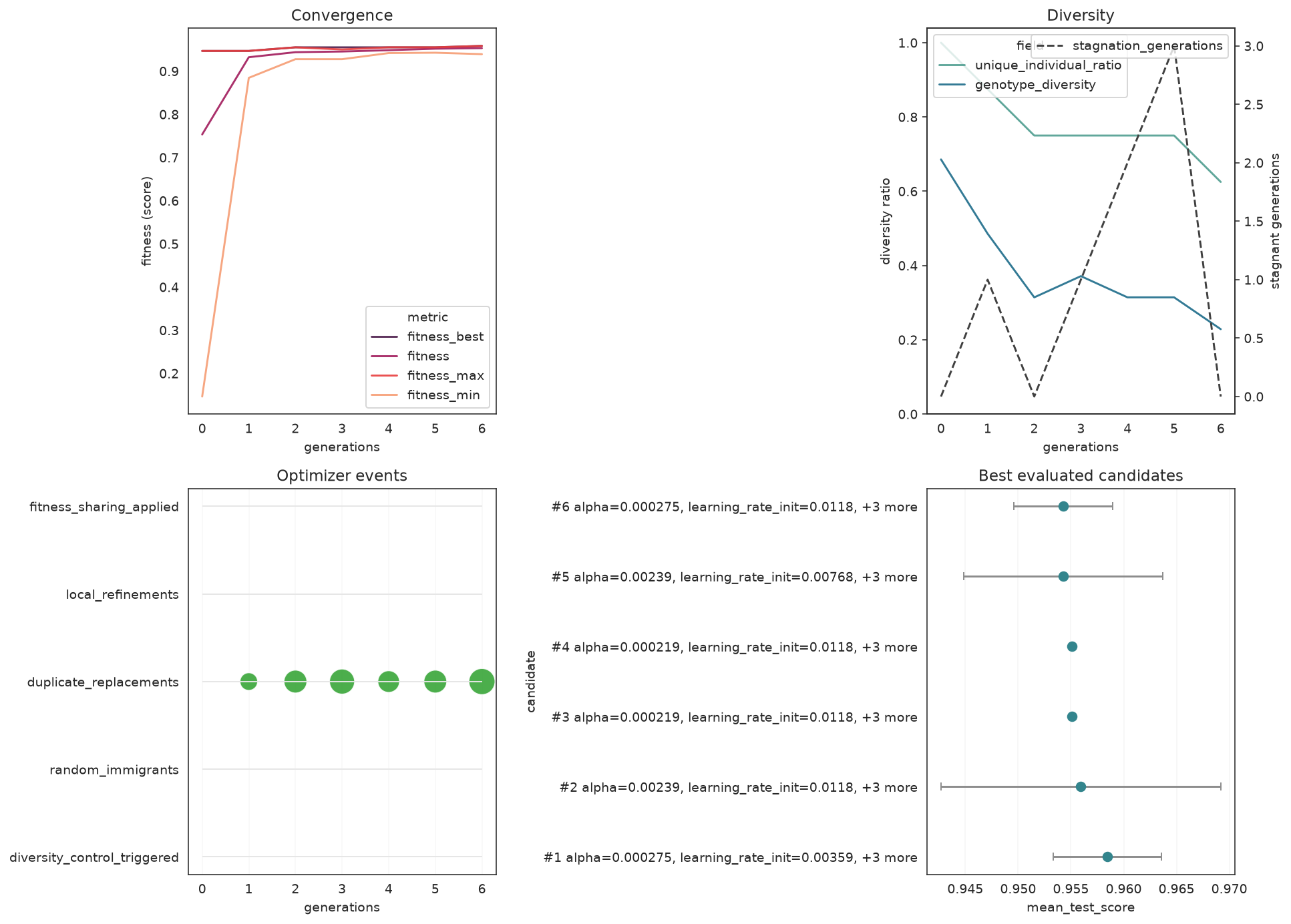
from sklearn_genetic.plots import plot_parameter_evolution

plot_parameter_evolution(search, parameters=["alpha", "learning_rate_init", "batch_size"])
plt.tight_layout()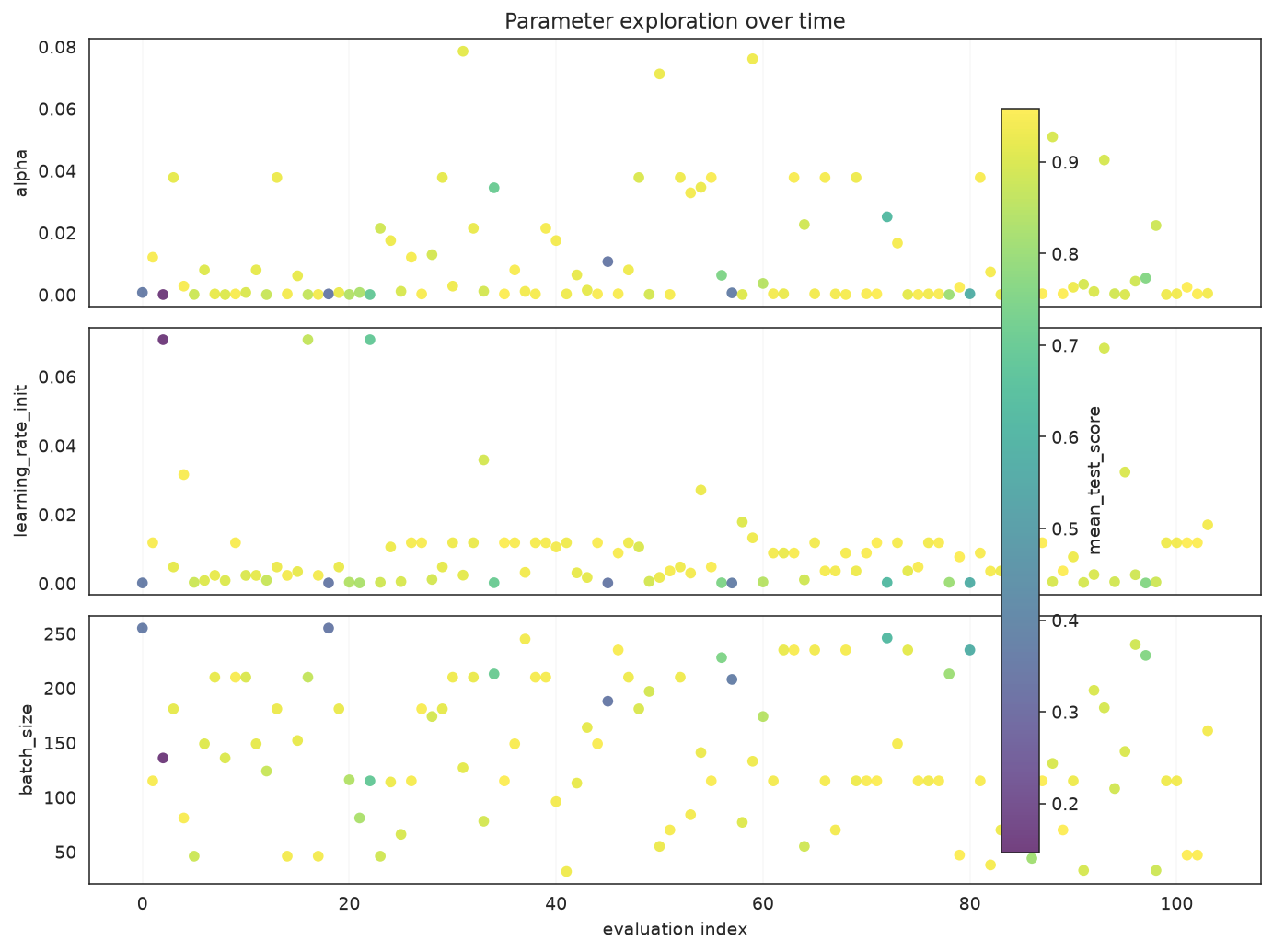
Feature Selection
GAFeatureSelectionCV searches for the most useful subset of columns. To make the task concrete we take the Iris dataset and bolt on 10 columns of pure noise; a good selector should keep the real measurements and discard the noise.
from sklearn.datasets import load_iris
from sklearn.svm import SVC

from sklearn_genetic import GAFeatureSelectionCV

iris = load_iris()
rng = np.random.default_rng(RANDOM_STATE)
noise = rng.uniform(0, 10, size=(iris.data.shape[0], 10))
X_fs = np.hstack([iris.data, noise])
feature_names = list(iris.feature_names) + [f"noise_{i}" for i in range(10)]
y_fs = iris.target

Xtr, Xte, ytr, yte = train_test_split(
    X_fs, y_fs, test_size=0.33, stratify=y_fs, random_state=RANDOM_STATE
)

selector = GAFeatureSelectionCV(
    estimator=SVC(gamma="auto"),
    random_state=RANDOM_STATE,
    cv=3,
    scoring="accuracy",
    evolution_config=EvolutionConfig(population_size=10, generations=8,
                                     elitism=True, keep_top_k=2),
    population_config=PopulationConfig(initializer="smart"),
    runtime_config=RuntimeConfig(n_jobs=-1, verbose=False),
)
selector.fit(Xtr, ytr)

selected = [name for name, keep in zip(feature_names, selector.support_) if keep]
print(f"Selected {len(selected)} of {len(feature_names)} features:")
for name in selected:
    print(f"  - {name}")
print(f"Holdout accuracy : {accuracy_score(yte, selector.predict(Xte)):.4f}")Selected 3 of 14 features:
- sepal length (cm)
- sepal width (cm)
- petal length (cm)
Holdout accuracy : 0.9800support_ is a boolean mask (True = kept). The search keeps the informative Iris measurements and drops most of the noise columns. Visualize the mask:
from sklearn_genetic.plots import plot_feature_selection

plot_feature_selection(selector, feature_names=feature_names)
plt.tight_layout()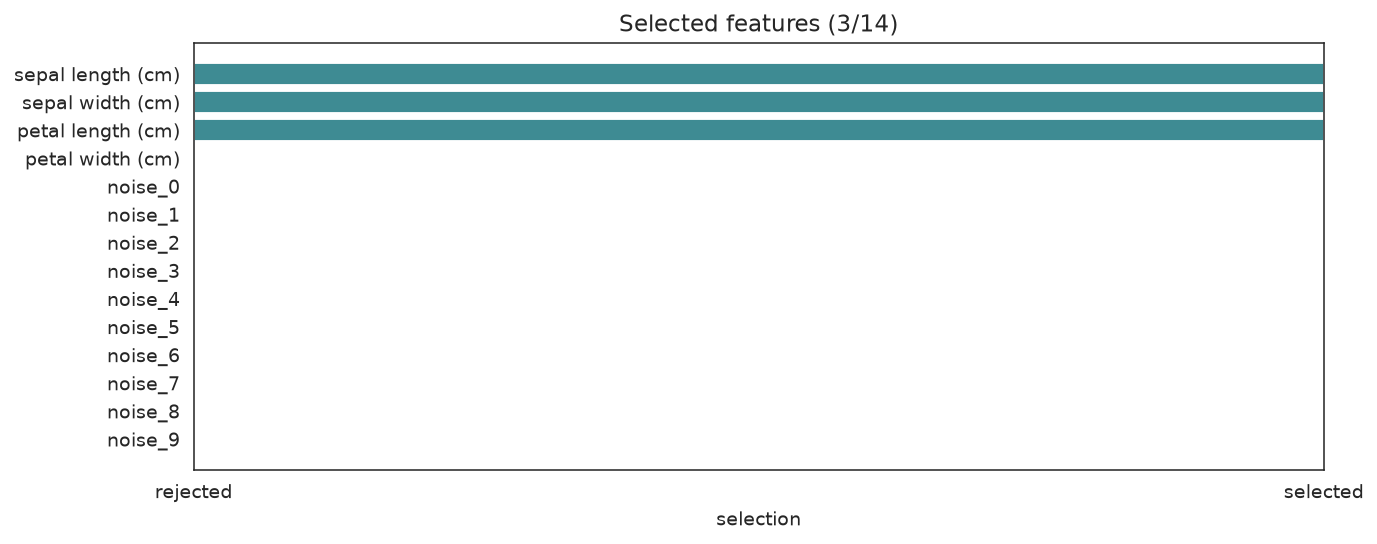
Tips & Gotchas
- Set
RuntimeConfig(verbose=True)to watch the per-generation log live. PopulationConfig(initializer="smart")is strongly recommended — it usually finds better solutions faster than a purely random start.- If
accuracyis already near 1.0 on your data, switch to a more discriminative metric (e.g.roc_auc,balanced_accuracy). - Check
fit_stats_["skipped_invalid_candidates"]after fitting — a non-zero value means some sampled configurations raised errors duringfit.
Next Steps
- When to Use — is a genetic search the right tool for your problem?
- Understanding Cross-Validation — read the generation log in depth
- Pipeline Tuning — tune a scikit-learn
Pipelinewithstep__paramnames - Callbacks — early stopping, progress bars, and checkpoints
- Plotting Gallery — every diagnostic plot, explained